01First, whether this path suits you at all
If your goal is simply to own a Web3 wallet, you do not need an exchange account first — a wallet can sit empty. But if you want assets in it, the usual first step is still converting government money through a licensed venue.
Three things worth knowing before you invest the time:
- Identity verification is required. Full functionality on any major platform depends on it. That is a regulatory requirement, not the platform being nosy.
- Availability varies by jurisdiction. What an exchange may offer where you live changes over time; confirm the current position for your own location before you open an account.
- Prices move violently. This site does not recommend what to buy and does not forecast anything. What happens to the value after you buy is entirely your risk to carry.
Still deciding whether self-custody is for you? Read Web3 wallet vs exchange account first — it prices both sides.
02Registration, and where the invite code goes
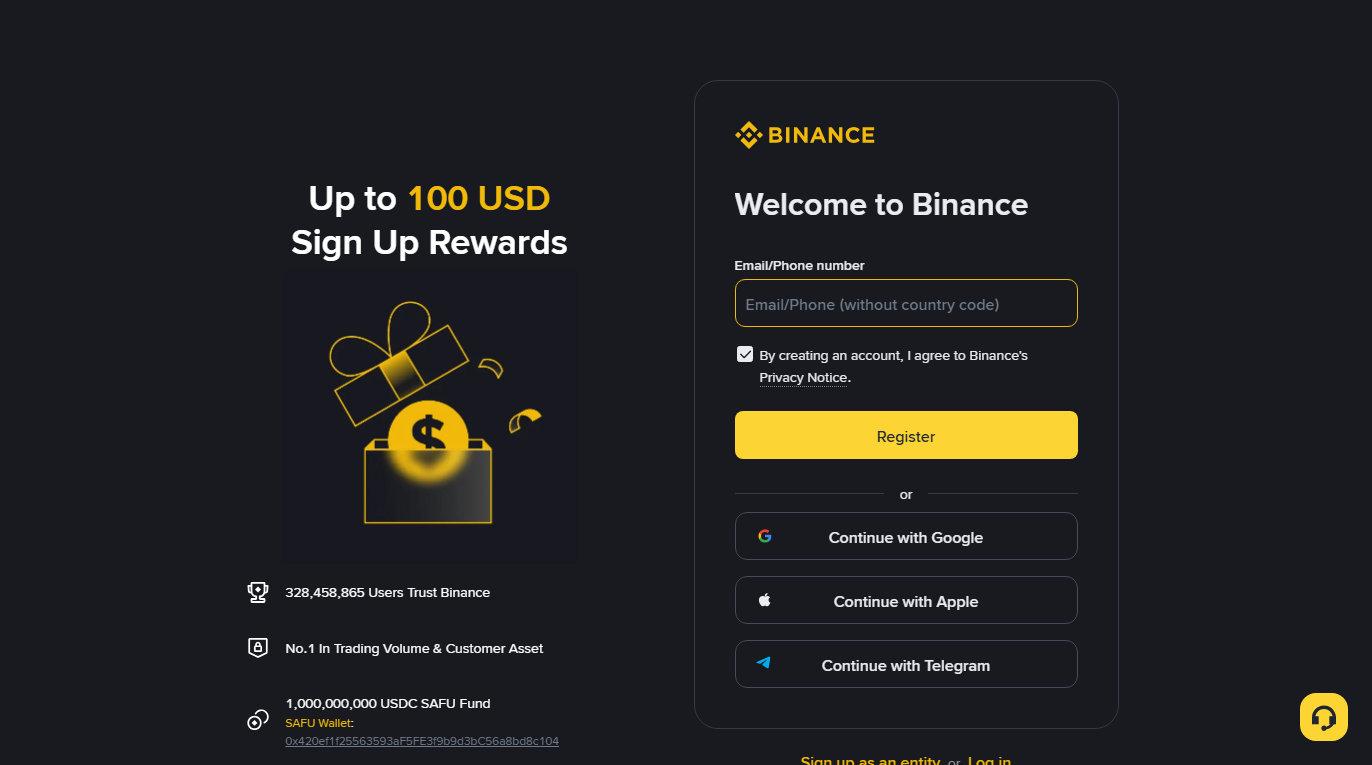
Registration itself needs three things: an email or phone number, a password, and one verification code. The invite code goes in the "referral" or "invite code" field, which is usually collapsed and needs expanding before you can see it.
In order:
- Open the registration page and check the domain in your address bar before typing anything. Impostor sites differ by a character or two.
- Enter an email or phone number, and set a password you do not use anywhere else.
- Find the referral field and fill it in. An invite code can generally only be entered during registration and cannot be changed afterwards, so if you intend to use one, this is the moment.
- Collect the verification code and finish.
If you want to use our code
Our invite code is BN0112. You can type it into the referral field yourself on the official site, or use the link below, which already carries it and saves you hunting for the field:
Open the official Binance registration page (code BN0112 included)
Disclosure: this is a referral link carrying our invite code, and we may receive a referral reward from the platform. Using it costs you nothing extra — the code only lowers what you pay: registering with one typically earns up to 20% off trading fees, with the actual figure being whatever Binance displays at the time and subject to their policy (checked 2026-08). This is the only article on the site carrying a registration link; no other page has a coded link. You are welcome to ignore it and reach the official site yourself — every step below works identically. After the page loads, check the address bar once more: the root domain must be binance.com, with the registration page living on its accounts subdomain. Anything spelled similarly on a different root domain is not official.
The top results for searches like "binance sign up" can be paid ad slots, and impostors buy those. There is exactly one reliable check: read the address bar. Separately, any page that asks for a seed phrase, a private key, or a transfer to "verify your assets" during registration is not an exchange.
03Identity verification, and where it usually stalls
Verification means submitting a document and passing a liveness check, to satisfy anti-money-laundering rules. It is also what gives you an appeals process and access to fiat rails later. What usually trips submissions up is not the process itself but photo quality and mismatched details.
The usual sticking points:
- Glare or a cropped document. All four corners must be in frame, no plastic sleeve, no harsh direct light.
- Name or date of birth not matching the document — including spacing and how unusual characters are rendered.
- Liveness check failing repeatedly. Move to even lighting, take off glasses, follow the prompts at the pace given.
- Proof of address rejected. What is wanted is a recent bill or bank statement showing name, address and date. A neatly cropped screenshot that loses the letterhead gets bounced.
- Stuck in review for a long time. Queues get slow. Resubmitting repeatedly sometimes puts you back at the end of the line.
Proof of address deserves extra time: a cropped screenshot that hides the letterhead does not show who issued the document, so a photo or export of the whole page is the safer submission.
04Security settings: do not skip this one
Three things immediately after the account exists: turn on two-factor authentication, set a withdrawal address whitelist, and enable an anti-phishing code. Together they take under ten minutes and they close several common routes to a stolen account.
- Two-factor authentication. Prefer an authenticator app over SMS; SIM-swap attacks defeat SMS. Write the authenticator's backup key down offline — you will need it when you change phones.
- Withdrawal address whitelist. Once on, funds can only leave to addresses you added in advance, and new additions have a cooling-off period. This is extremely effective against the "logged in and drained within minutes" scenario.
- Anti-phishing code. Set a string only you know, and legitimate emails from the platform will carry it. An "official" email without it is phishing, no further analysis needed.
- Review your active sessions and kick out anything you do not recognise.
Keep the exchange password, the email password, the authenticator backup and your wallet's seed phrase in separate places, and do not derive them from the same pattern. One compromise should not cascade.
05Funding the account
Two common routes: buy directly with a card or a supported payment method, or trade peer-to-peer with other users. The fee structures and the risks differ; for a first attempt, take the one the platform supervises end to end.
| Route | Upside | Watch out for |
|---|---|---|
| Card or supported payment method | Simple, handled inside the platform | Not available for every region or card type, and the rate is usually worse |
| Peer-to-peer | Often cheaper, more payment options | You pay a stranger directly from your own bank account; if that seller turns out to be tied to fraud, your transfer can be pulled into a dispute and your bank account can be caught up in it |
That second warning is not theoretical, and resolving it takes a long time. If you go that route, deal with high-volume counterparties who are fully verified, and keep the entire exchange inside the platform's process — never settle privately off-platform.
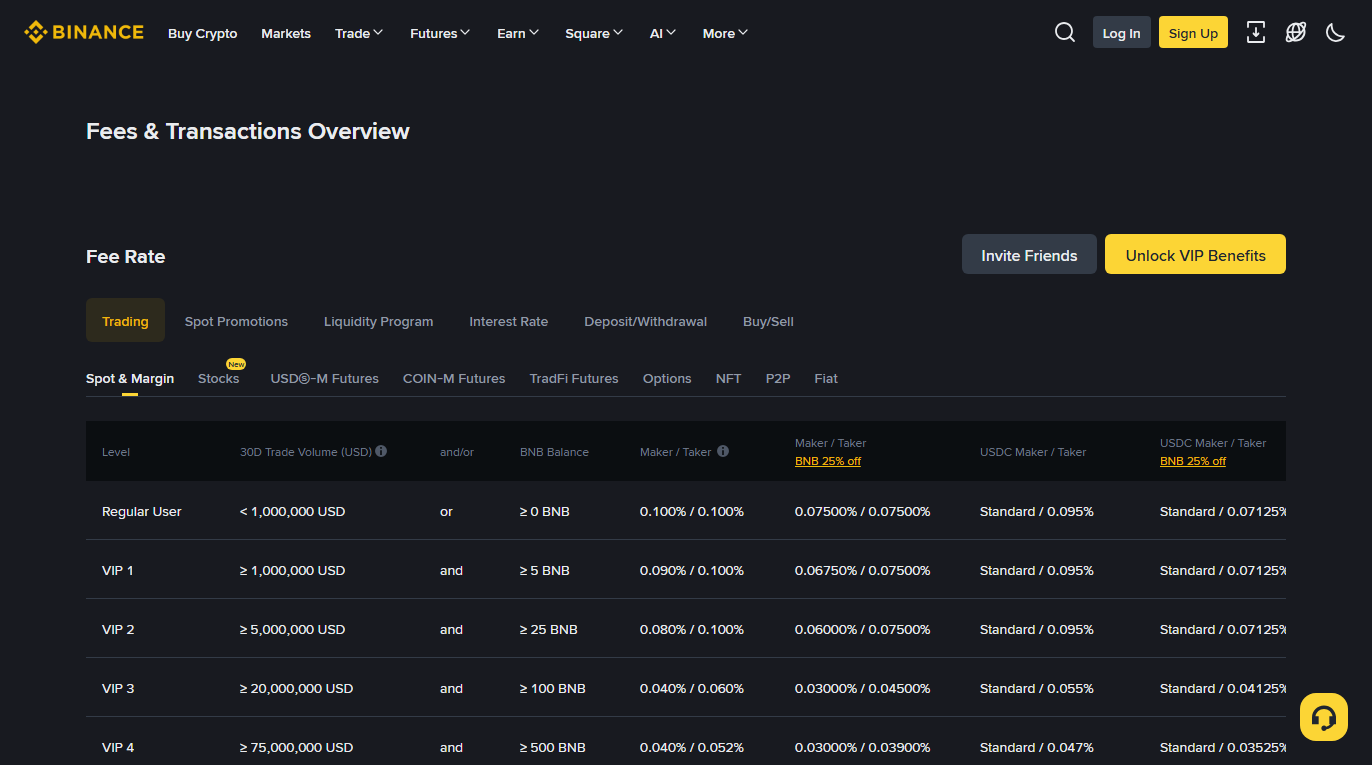
Exact rates vary by region and method and get adjusted, so we do not print numbers here. Use whatever the page shows you at the time; the public fee schedule is a reasonable place to see how it is structured.
06Your first purchase: keep it simple
You do not need to learn order types today. Use the plainest buy entry, take the market price, and pick an amount you genuinely do not care about. The goal is to prove the pipeline, not to make money.
- Buy the asset you actually intend to use. If the plan is to move it to a Web3 wallet and do something on-chain, you will probably also need a small amount of that chain's native token to pay network fees — see gas fees.
- Stay away from leverage and derivatives. Those are different products with a different risk structure, and a first account is not where to start.
- Check what you are actually buying. Similarly named tokens exist; go by the contract address or the platform's full designation.
07Withdrawing into your own wallet
This is where the guide is heading. Two things matter more than everything else: pick the right chain, and send a small amount first. Get those right and little else can go badly.
The full order:
- Have the wallet set up already, with the seed phrase backed up offline.
- In the wallet, switch to the network you intend to use and copy the receiving address.
- Back on the exchange withdrawal page, choose the asset and paste the address.
- Choose the network. It has to match what your wallet is on. Consequences and recovery odds are in what a chain is, and what happens when you pick the wrong one.
- Withdraw a very small amount and wait for it to land.
- Once it does, send the rest.
Withdrawals carry a network fee, and it varies enormously between chains — which is also why people switch chains to save money and then come unstuck on whether the recipient supports that chain. The figures live in the deposit and withdrawal tab of the fee page shown above.
Full detail on the withdrawal itself, including confirmations and what to do when nothing arrives, is in moving coins from an exchange into your wallet.
Coins at your own address, key in your hands: that is the moment you are actually in self-custody. What comes next is not buying more, it is understanding signatures and approvals — from here on, the thing most likely to cost you money is not the price, it is one mistaken confirmation.
08Where this commonly goes wrong
The usual trouble spots: documents rejected, verification codes not arriving, the wrong address or network on withdrawal, and risk controls limiting withdrawals. The first two are annoyances; the last two can cost you.
- No verification code. Check the spam folder; on the phone route, check whether a blocker is intercepting it. Repeated resends can trip a rate limit, so wait a few minutes.
- Verification keeps failing. See the list in section 03. Changing the lighting and background solves most of it.
- Withdrawal rejected or asking for extra checks. New accounts, new devices, new addresses and large amounts all legitimately trigger additional review. Complete what it asks.
- The pasted address is wrong. Clipboard-hijacking malware is a real technique. After pasting, verify the beginning, the end and a section in the middle. The address format validator can sanity-check the format, but remember: a valid format is not a correct recipient.
- The wrong network. The single most likely way to lose funds irreversibly. Paying a slightly higher fee on a chain both sides clearly support is worth it.