01Wallet prompts come in two kinds
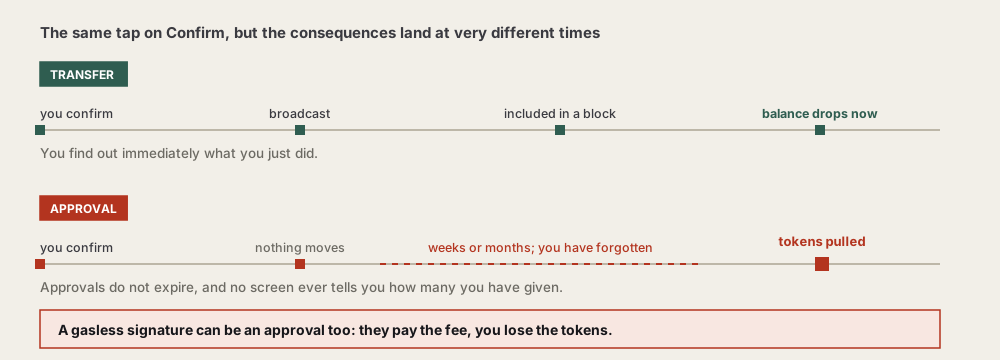
One is a transfer: you sign, and the asset leaves your address immediately. The other is an approval: you sign, nothing moves, and you have handed some contract permission to move it later. The second is the dangerous one, precisely because nothing appears to happen.
The difference is timing. A transfer's consequence is visible at once — the balance drops and you know what you did. An approval's consequence is deferred: signed today, used possibly weeks later, by which point you have forgotten the prompt entirely.
A third kind sits in between: a plain message signature, commonly used to prove an address is yours. Usually harmless — though there is an abused variant, covered in section 04.
What each looks like on screen
Wording varies between wallets, but these characteristics are fairly stable, and they are more reliable than button labels:
| Kind | Usually shows | Costs a fee? | When it bites |
|---|---|---|---|
| Transfer | Destination address, amount, estimated network fee | Yes | Immediately; the balance changes |
| Approval | Token name, an allowance figure, the contract being authorised | Yes | Later, possibly months later |
| Message signature | A block of text or structured data, no fee estimate | No | Depends on content; can equal an approval |
The last row deserves the most attention: no fee makes it look the most innocuous, and it is currently the most deceptive of the three.
02What an approval actually is
A token contract keeps a record saying "address A permits contract B to move up to N of this token." Signing an approval writes a line into that record. From then on, B can take up to that amount without prompting you again. That approve / allowance mechanism comes from the token standard EIP-20.
Why does the mechanism exist? Because on-chain swaps, staking and similar operations need a contract to move tokens on your behalf. Asking for confirmation every single time would make the experience unusable. So it was designed as authorise once, use repeatedly.
The convenience has a price:
- Approvals do not expire. The one you granted last year for a single swap is still live.
- The contract itself may be compromised later. Safe today does not mean safe forever, and your approval is still sitting there.
- You will essentially never check. No interface anywhere tells you "you currently have 37 outstanding approvals."
Which makes periodic clean-up necessary; how to check and revoke is in checking and revoking approvals.
03What unlimited allowance means
Approvals carry an amount. Many applications request an enormous number by default, which in practice means "this contract may move your entire balance of this token, including anything you add later."
Why do they do it? So users only ever approve once, no matter how much they subsequently do. From a product perspective that is reasonable. From a risk perspective it removes the ceiling.
| Capped | Unlimited | |
|---|---|---|
| How much it can move | Only the amount you set | The whole balance, plus future deposits |
| Once used up | Exhausted; needs re-approving | Still live |
| Convenience | More prompts | Once and done |
| If the contract fails | Loss capped at the allowance | That token can go entirely |
Does lowering the allowance break things
This is why people leave the field alone. In practice, as long as the allowance is not below what this operation actually needs, nothing fails. Most wallets display the amount involved; set the allowance to that, or slightly above.
Two minor annoyances come with it: once the allowance is spent, the next operation needs another approval and therefore another fee; and some applications provide no way to edit it in their own interface, leaving you to do it on the wallet side.
Whether that is worth it depends on how much of that token you hold. The larger the balance, the better capping looks — the potential loss from an unlimited approval scales with your balance while the extra fees do not.
Most wallets let you edit the allowance in the prompt. For anything unfamiliar, set it to what this operation genuinely needs. For a mature application you use regularly and at scale, trading convenience for an unlimited allowance is defensible — as long as it goes onto your periodic review list.
04"No gas, so no risk" is wrong
Costing no gas only means the signature did not go on-chain at that moment. It does not mean it has no force. Certain off-chain signatures can be submitted by whoever receives them, with the same effect as you authorising a transfer yourself.
This is the most deceptive technique currently in circulation, precisely because users have been trained that prompts showing a cost deserve caution. These show none, and therefore look far more harmless.
The mechanism: certain standards let you sign a piece of structured data with your key, where that data itself describes an authorisation or a transfer. Once signed, whoever holds the signature can submit it on-chain at any later time and pay the fee. They pay the fee; the assets that move are yours.
Do not judge risk by whether it costs money. Judge by what this content grants. If you cannot read what it says, do not sign it — that single rule transfers directly to every prompt you will ever see.
05The common malicious shapes
What they share is a reason you must confirm right now: claim a distribution, verify your wallet, unlock eligibility, join an event. All of them are actually after an approval.
- Fake claim pages. The page shows a reward waiting; tapping claim raises an approval request.
- "Verify wallet ownership." Genuine ownership checks need only a plain message signature and touch no asset permissions. If the prompt names a token and an allowance, it is not a verification.
- Cloned interfaces of well-known applications. Identical layout, domain off by a character or two, and the contract address belongs to the attacker.
- "Your assets are at risk, migrate now." Fear as the driver, so you confirm quickly.
- Bundled approvals. A single prompt covering permissions for several tokens, of which you read the first.
The genuinely hard case
Those examples read as easy to spot. Reality has a grey zone: legitimate applications you actually want to use also request unlimited allowances. At that point "unlimited request equals scam" stops working as a rule.
Three replacements that do work:
- How did I arrive here? Reaching a site from your own bookmarks or by typing the domain is far more trustworthy than following a link. Nearly every clone needs a link to get you there.
- Does the request match what I am doing? Swapping, and it asks for permission on the token being swapped — consistent. Browsing, and it raises an approval — not consistent.
- Is that contract address the one the project publishes? The hardest check and the strongest; the next section covers it.
When all three hold, granting a mature application an unlimited allowance is an acceptable trade — provided it goes on your review list rather than being granted and forgotten.
How these situations reach you, and the non-signature routes, are in how wallets actually get drained.
06What to read before you confirm
Four things: is this a transfer or an approval, which token, how much, and is that contract address the one you expect. If any of the four is unclear, close the prompt.
- The request type. Wallets usually label it at the top. Anything reading "approve", "permit" or similar is granting permission.
- Token and allowance. If the allowance is an absurd number or reads "unlimited", lower it first.
- The counterparty. Is that contract address the official one for the application you are using? This one takes effort, and it is what stops clones.
- What you are doing. If you are only browsing, or only meant to connect, an approval prompt is itself the anomaly.
How to verify a contract address
It sounds technical and takes three steps:
- Copy the counterparty address out of the wallet prompt.
- Find the address the application publishes, in its documentation or official account.
- Compare character by character, especially the middle — forged addresses are frequently built to match at both ends.
If you cannot find a published address anywhere, that is itself a signal: a serious application puts its contract address somewhere visible, because that is the only way its users can verify it.
You can also paste the address into a block explorer and look at when it was deployed and how many people have interacted with it. A contract deployed yesterday with a handful of interactions, presented as a well-known application, answers the question.
Reading a structured-data prompt
The gasless requests from section 04 usually arrive as structured data rather than a sentence, and wallets render them as a set of labelled fields. It looks intimidating and only three parts actually decide anything.
The domain block states which contract, on which chain, this signature is meant for. Two fields matter: the name, and the address it is bound to. A signature produced for one contract cannot be replayed against a different one — which is precisely why the domain is worth reading. If it names something you have never used, nothing below it needs your attention.
The message block is the substance, and its field names tell you the type. A few you will genuinely meet:
- Fields resembling owner, spender, value and deadline — this is an allowance in signature form. It does exactly what an on-chain approval does, without costing you gas, and whoever holds it submits it whenever they like.
- A field holding a list of tokens, or an amount alongside a recipient — a batched permission, or an instruction that moves assets. Either way, more than a login.
- A short human-readable string and a random value — an ordinary sign-in. No token names, no amounts, no spender. This is the harmless case.
The deadline or expiry, where present, tells you how long the signature stays usable. A distant one is not automatically malicious, but it does mean the thing you sign today remains live for a long time.
You do not need to understand the encoding. Scan the field names for a spender and an amount. If both are there, you are granting permission, whatever the button says.
A worked example: what one swap actually asks for
Confusion often comes from the number of prompts a single action produces. Swapping one token for another on-chain, first time, typically raises three, and they are not the same kind:
- Connect. The site asks to read your address. Nothing is signed, nothing moves, no permission is granted. Approving this is low-stakes.
- Approve. Before the contract can take the token you are selling, it needs an allowance. This one costs gas and shows a token name plus an amount — the moment to check the figure and lower it if the default is enormous.
- The swap itself. Now the actual exchange, showing both amounts and a fee estimate.
Two things follow from that sequence. First, the second prompt is where the lasting decision is made, and it is the one people click through fastest because it feels like a formality standing between them and the thing they came to do. Second, swapping the same token again will not raise it — the allowance is still there from last time. Which is a useful signal in reverse: if an application you have used before suddenly asks for approval again, something changed, and it is worth knowing what.
The variant to watch is a fourth prompt appearing where you expected three, particularly a gasless one framed as verification. In a genuine swap there is nothing left to verify at that stage.
Judging each case is tiring, and eventually you will judge one wrong. So the more durable approach is to separate assets: use a wallet holding small amounts for connecting to sites, and keep the bulk in a wallet that connects to nothing. Then a bad call has a fixed ceiling. The setup is in setting up your first wallet.