01The conclusion first
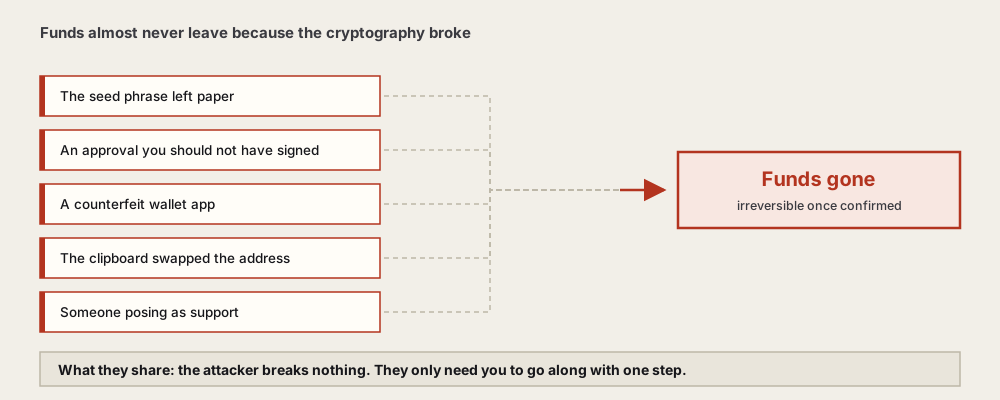
Assets almost never move because someone broke the cryptography. The overwhelming majority travel along five paths: the seed phrase ended up somewhere networked, you signed an approval you should not have, you installed a counterfeit wallet, your pasted address was substituted, or someone convincingly impersonated support.
What those five share: the attacker does not have to break through any technical defence. They only need you to go along with one step. Which means the defence is not a stronger password either — it is fixing the habits at those five points.
A second shared trait is worth stating up front: none of these paths requires knowing who you are. They are dragnets — scanning leaked cloud accounts in bulk, seeding counterfeit pages in bulk, messaging in bulk under public requests for help. So "I do not hold much, why would anyone target me" does not hold. Nobody is targeting you. You simply walked into a net that is always open.
Every section below has the same structure: how the path starts, what identifies it, and the one habit that genuinely severs it.
02Path one: the seed phrase left paper
The most common by a distance. Once a seed phrase has been photographed, screenshotted, stored in the cloud, typed with a keyboard or messaged to yourself, its security drops to that of the networked account holding it. What the attacker targets is often that account, not your wallet.
The frightening part is the delay. The exposure may have happened months ago and the use happens on a day when you have not touched anything. You cannot reconstruct what you did wrong, because at the time it did not look like anything.
Typical entry points: a cloud account breached through credential stuffing, photo permissions abused by some app, an old phone sold without being wiped properly, a file left on a shared computer.
The underrated entry point: old devices
Retired phones, sold laptops, work machines handed back — any of them may still hold wallet data, screenshots, or a few words jotted into a notes app. Most people, disposing of a device, think "delete the photos". Very few think "uninstall the browser extension wallet" or "check whether cloud sync kept a copy of this device's contents".
The correct order is: sign out of everything and unlink cloud sync on the device, then factory reset, then dispose. Doing it the other way round — resetting first and remembering the accounts afterwards — leaves plenty of data already sitting in the cloud.
And one more: thinking you are only testing
Some people reason "there is barely anything in this wallet" and park the seed phrase somewhere convenient, intending to build a proper one later. The problem is that later rarely arrives. Money trickles in, the habit never changes, and by the time the balance is meaningful that convenient copy is still exactly where it was.
Handling the phrase to the real standard from day one is far less work than migrating afterwards, and considerably more reliable than "I will get serious about this eventually".
If your assets were emptied in one sweep, across several chains and several addresses, that points to seed-level exposure rather than any single approval. In that case revoking approvals is pointless; the only move is getting whatever remains into a new wallet immediately.
03Path two: an approval you should not have signed
Your seed phrase never leaked, the device is clean, and some contract holds permission to move your tokens. Perhaps from a "claim your reward" page weeks ago, perhaps from an off-chain signature dressed up as wallet verification.
The identifying trait: only certain tokens are gone while everything else remains. Approvals are granted per token.
The usual packaging:
- You have an unclaimed distribution — claim here.
- Participation requires verifying wallet ownership first.
- Your assets are at risk; migrate to a secure address immediately.
- A page identical to a well-known application, on a domain off by a character or two.
Pay particular attention to requests that cost no network fee. Many people read "free" as "harmless", while certain off-chain signatures themselves describe an authorisation or a transfer that whoever receives it can submit later at their own expense.
Spotting an approval request in three seconds
You do not need to understand every field. Three questions suffice:
- Does it name a token? A plain identity signature does not. If a token name appears, this concerns your assets.
- Does it show an amount, or the word unlimited? That is the allowance — how much they may take.
- Does what I am currently doing require granting this? Just looking, or just connecting, does not.
If you cannot answer any one of them, close the prompt. A legitimate application does not break because you checked twice and you can always come back; what a scam cannot survive is you slowing down.
Why "I am careful" is not enough here
Because these pages appear at the moment you have already decided to do something: you are looking for an application's entry point, claiming something you genuinely qualify for, or sorting out a stuck transaction. You walked into the context yourself; only the page is fake. In that instant, a person's default is to keep going, not to re-verify.
Which is why the more reliable answer is not more vigilance but a change of structure: connect to everything from a wallet holding small amounts, and keep the bulk in a wallet that connects to nothing. Then a bad call has a defined ceiling.
04Path three: a counterfeit wallet app
A fake app lets you complete setup normally, with an interface indistinguishable from the real one. The only difference is that while you write your seed phrase down, it transmits it. The funds usually are not touched until you have deposited something worth taking.
Where they appear: search result ad slots, third-party download sites, forwarded installers, and cloned official sites. Browser extension impersonation is comparatively more common because the listing bar is lower.
Usable checks:
- Do not click search ad slots; type or verify the official domain yourself.
- In an app store, read the developer name, listing date and review count. Counterfeits are typically new with few reviews.
- Install nothing anyone sends you, friends included.
- After installing, see whether it asks for a seed phrase before you have created anything — if so, uninstall it.
05Path four: the pasted address was swapped
A class of software sits on a device watching the clipboard, and whenever the contents resemble a crypto address it substitutes its own. What you copied was right; what you pasted is not.
These substitutions usually pick an address matching at both ends, specifically to defeat the "I glanced at it" check. So checking cannot stop at the ends — scan the middle too.
Habits that reduce this path:
- After pasting, verify in segments, middle included.
- Send a small amount before a large one, and only proceed once it lands.
- Do not handle transfers on a computer carrying software of unknown provenance.
- Use an exchange's withdrawal address whitelist to fix your regular destinations.
06Path five: someone convincingly impersonated support
This path attacks no device. It attacks your emotional state, and it arrives when you are already in trouble — a stuck transaction, funds that have not landed, an account anomaly. You need help, and someone appears.
Typical shape: you post asking for help somewhere public and receive a private message within minutes. The sender is professional, calls you a user, uses the right terminology. They build trust first, then move you to a "ticket system" or a "security verification page".
The request always ends at one of two things: type your seed phrase, or confirm something on a page.
Make it fixed: anyone who contacts me first, after I have asked for help, gets ignored. It will occasionally misjudge someone genuinely kind. It also requires no discernment at the exact moment your discernment is least reliable.
And a technical fact worth carrying: no legitimate product's process needs your seed phrase. Proving an address is yours is done by signing locally, and the phrase never leaves the device. So the request itself settles the question.
07The second wave: aimed at people already hit
After a loss, another round is waiting: people and sites claiming to recover stolen assets, restore seed phrases, or freeze the attacker's address. Their target market is you, an hour after it happened, with your judgement impaired.
Shapes: an up-front fee followed by silence; a request for "part" of the phrase to verify; a "recovery tool" that is itself the theft; a direct message under your public request for help.
On-chain transfers are irreversible once confirmed, and no institution can reverse one. Anyone claiming otherwise is trading on your reluctance to accept that.
08If it has already happened, do these first
Three things, in order: move whatever has not gone to a brand new, properly backed-up wallet; work out whether this was seed-level or approval-level; and refuse all unsolicited help.
- Rescue the remainder. If any balance is left, move it to a freshly generated address now. Write that new wallet's seed phrase down properly as you go — do not create a second problem in the panic of the first.
- Classify it. Multiple chains and assets emptied at once points to seed exposure; specific tokens gone points to approvals.
- If it is approvals, revoke the suspicious permissions on that address and stop using it.
- If it is the seed phrase, every address under that wallet is finished and revoking is pointless.
- Preserve evidence. Transaction hashes, times, what you were doing. For a large amount a police report is reasonable, with realistic expectations about recovery.
- If this address has ever interacted with your exchange account, check that side too: change the password, terminate other sessions, confirm the withdrawal whitelist is unaltered. Shared email addresses or password patterns transmit risk between them.
- Accept no help that arrives unsolicited. See the previous section.