01Is my wallet hacked? What that zero transfer actually means
Receiving one of these entries is not, by itself, evidence that your seed phrase has leaked or your approvals have changed: on a public chain anyone can send a transfer to any address; you cannot block it and nobody needs your permission. The entry itself does not touch your funds; if you have other worries, you can check your balance and approvals on a block explorer or with an approval checker — that is a separate question from this entry. Etherscan opens its own explainer with the same reassurance: if you see these muted transfers, your wallet is fine and your keys are safe.
The danger sits further down the timeline. That line was planted in your history so that one day you would copy from it. Security write-ups call the technique address poisoning; its most common form is the zero-value token transfer, which is why you will also see it described as a "zero transfer scam".
So the useful question here is not how to get rid of the entry. It is how to make sure the entry never gets a chance to work on you — and those two goals call for quite different habits, as section 05 explains.
02How a scammer makes an address that looks like yours
An address is a long string derived from a public key. Nobody memorises one. Wallets, block explorers and exchange withdrawal screens nearly always shorten it: a handful of leading characters, an ellipsis, a handful of trailing ones. After a few months, those two ends are how you recognise an address.
The attack is built around exactly that habit. The MetaMask Help Center page on address poisoning describes it plainly: scammers run vanity address generators until one produces an address whose opening and closing characters match yours. The long middle section will not match, of course — but that section is the part your screen hides.
Then they send you something worthless from the new address, often zero tokens. They never touch your phone or computer, and you never have to click anything.
One limit worth knowing: generating an address identical to yours is out of reach. Only the characters you actually look at can be imitated.
03The one action the scam is waiting for
There is a single way for this to pay off. You need to send funds, you remember "I sent to that address last time", you open your history, copy the address from that row and paste it into the send field.
Copying from history feels sensible. Addresses are too long to type, labels you saved may not have survived a new phone, and when you withdraw from an exchange back to your own wallet you need your own address from somewhere. The history list is simply the nearest place to look.
Etherscan adds a detail that matters: in the Token Transfers tab, the impersonating address tends to appear immediately before or after the genuine entry. Familiar ends, adjacent row, one quick copy — that is the whole plan.
Sending to a stranger's address for the first time, most people check every character. Sending to an address they have "used before", they skip the check. These fake entries are designed for the second situation. They do not need to fool your judgement, only to arrive on a day you were not using it.
04Which characters of a crypto address should you check?
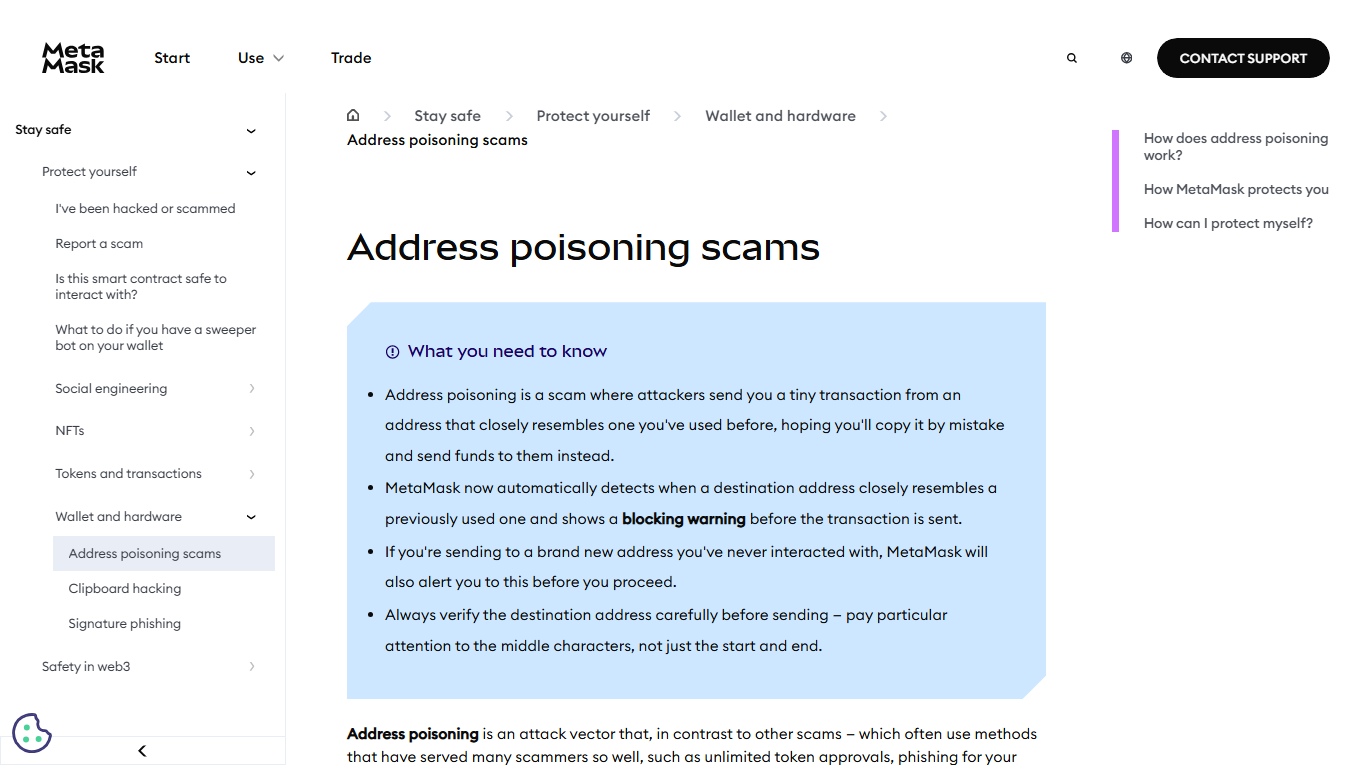
The middle ones. The start and the end are precisely the parts that were copied, so matching them proves nothing. MetaMask's own advice is to pay particular attention to the middle characters, not just the start and end.
The same page explains what MetaMask now does on its side. When you send, it compares the destination against your transaction history; if an address matches a previous one on the first four and last four characters but differs in between, you get a blocking warning before anything is submitted. Sending to an address you have never interacted with also triggers a notice — which says nothing bad about that address, only that it deserves a second look.
Do not read too much into the absence of a warning. Detection differs from wallet to wallet and can change between versions, so "no pop-up appeared" should never count as your check.
Our address format validator cannot help with this either. It tells you whether a string is well-formed and whether its checksum holds up. A poisoned address passes both tests: a lookalike is a perfectly valid address — it just belongs to someone else. Telling the right one from the wrong one depends on where you got it, never on its format.
05Three habits that take eyesight out of the equation
Comparing characters is human work, and humans get tired. The steadier fix is to stop sourcing addresses from your transaction history at all.
- Save addresses you send to regularly. MetaMask's help page calls this saving them as verified contacts in your address book; most other wallets have something similar. You verify the address once when you save it and pick it from the list afterwards. On an exchange, the equivalent is the withdrawal address management page.
- Send a small amount first. Move the rest only after the test arrives. The same habit protects you from picking the wrong network or an address that cannot receive the asset; the cost is one extra network fee. Our piece on choosing the right chain makes the same recommendation for a different reason.
- Move the final check to a separate screen with a hardware wallet. Most hardware wallets show the destination on the device itself and will not sign until you confirm it there; MetaMask lists this among its own recommendations. If something on the computer or phone has gone wrong, the device screen still shows the address that is about to be signed.
Hiding the junk entries is a separate matter. Etherscan mutes zero-value token transfers and marks them with a grey warning icon, and some wallets have a spam or hidden-token filter — check your wallet's help pages to see whether yours does. Turn it on if it exists; the list gets much tidier. Bear in mind what it changes, though: only what you see. Transfers into your address will keep coming, and the outcome still depends on where the address in your send field came from.
06Address poisoning vs clipboard hijacking
The end result looks identical — funds land at an address you never meant to use. The cause lives in a completely different place, so the response differs too.
- Address poisoning happens on-chain. The attacker does not need to touch or install anything on your devices; the only thing contaminated is the public record of your transactions. (That does not prove your devices have no other problem — only that address poisoning itself does not involve them.)
- Clipboard hijacking happens on your device. Malware watches the clipboard and swaps anything that looks like an address. That belongs among the five paths by which wallets get drained, and the fix is cleaning or replacing the device.
Paste, then compare with what you copied from. If the pasted text differs from the source, your device is the problem. If they match and you simply copied the wrong row, that is poisoning. You can settle it on the spot.
07Sent crypto to a poisoned address — can it be reversed?
Once confirmed, an on-chain transfer stays put. The coins sit at an address the attacker controls and no institution can pull them back. Keep the same evidence you would for any loss: the transaction hash, the time, what you were doing at that moment.
Expect a second approach soon after: people and websites promising recovery. They look specifically for people who just lost money; the drained-wallets piece describes the shapes those offers take in its section on the second wave.
One thing you can do immediately: save your genuine destination address to your address book, and break the habit the fake entry relied on. An address that has been poisoned once is likely to be targeted again, since it is now on the attacker's watch list.